RGMiner 窗口消息说明
如何看懂 RGMiner 的控制台输出——矿池连接与登录、矿池下发的任务、 每张 GPU 上启动的挖矿内核,以及 找到 → 提交 → 接受 的份额流程。
挖矿软件窗口里能看到什么?
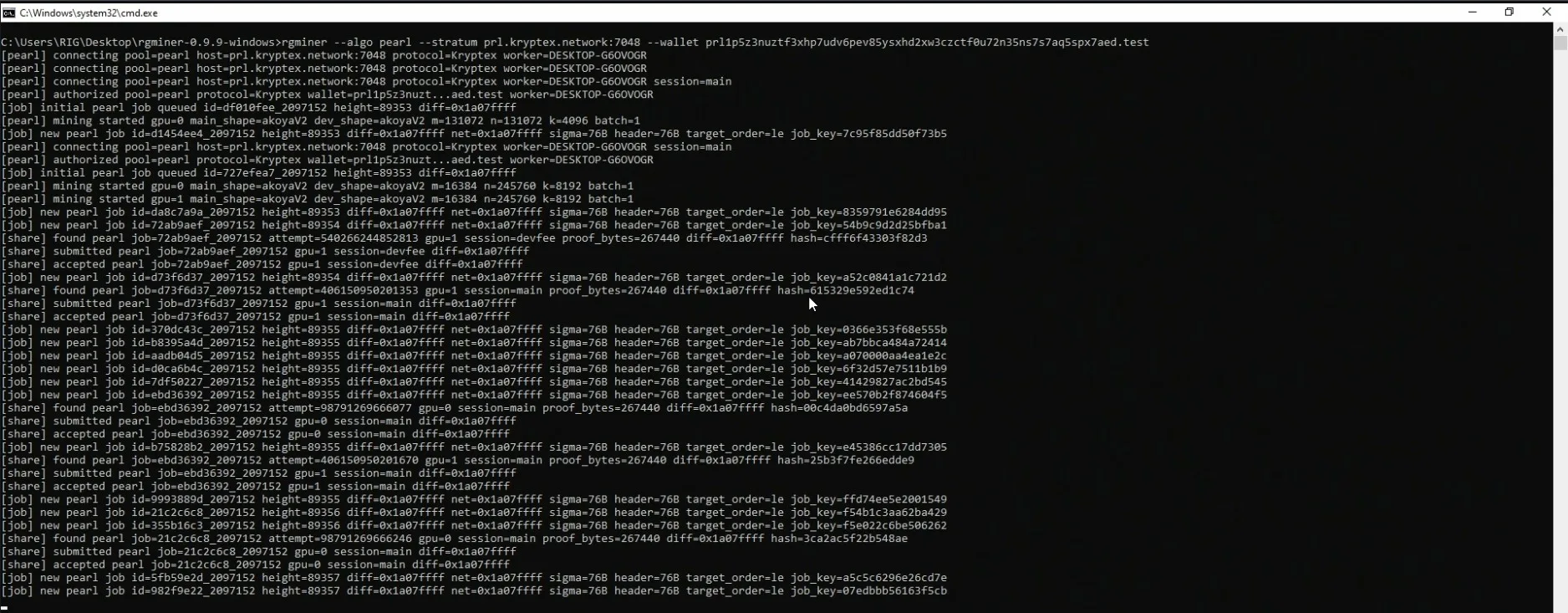
第一行是启动挖矿软件的命令——算法、矿池和你的钱包:
rgminer --algo pearl --stratum prl.kryptex.network:7048 --wallet prl1yourwallethere.test
之后 RGMiner 会输出带标签的日志行。三种标签分别是 [pearl](矿池/会话)、[job](矿池下发的任务)和 [share](你提交的结果):
[pearl] connecting pool=pearl host=prl.kryptex.network:7048 protocol=Kryptex worker=DESKTOP-G6OVOGR
[pearl] authorized pool=pearl protocol=Kryptex wallet=prl1p5z3nuzt…aed.test worker=DESKTOP-G6OVOGR
[job]   initial pearl job queued id=df010fee_2097152 height=89353 diff=0x1a07ffff
[pearl] mining started gpu=0 main_shape=akoyaV2 dev_shape=akoyaV2 m=131072 n=131072 k=4096 batch=1
[job]   new pearl job id=d1454ee4_2097152 height=89353 diff=0x1a07ffff net=0x1a07ffff sigma=76B header=76B target_order=le job_key=7c95f85dd50f73b5
[share] found pearl job=72ab9aef_2097152 attempt=540266244852813 gpu=1 session=devfee proof_bytes=267440 diff=0x1a07ffff hash=cfff6f43303f82d3
[share] submitted pearl job=72ab9aef_2097152 gpu=1 session=devfee diff=0x1a07ffff
[share] accepted pearl job=72ab9aef_2097152 gpu=1 session=devfee diff=0x1a07ffff
1. 连接 [pearl] connecting — RGMiner 建立矿池连接。它会自动选择矿池协议方言(在 Kryptex 矿池上为 protocol=Kryptex——无需传入 --proto),worker 是矿机名(这里因为点后面没有设置名称,所以使用了计算机名)。
2. 登录 [pearl] authorized — 矿池已接受你的钱包和矿机名;从这里开始就在挖矿了。显示的钱包地址是你的地址(已缩写)。
3. 任务 [job] initial … / new … — 矿池下发的任务。height 是区块高度,diff / net 是份额难度和全网难度,job_key 用于标识任务。
4. 内核启动 [pearl] mining started gpu=N — Pearl 内核已在各 GPU 上运行。main_shape / dev_shape 是内核变体(akoyaV2),m/n/k 是矩阵维度——这些值因显卡而异。
5. 份额 [share] found → submitted → accepted — 一个结果的完整流程:在 GPU 上找到、发送到矿池、被矿池接受。session=main 是你自己的挖矿;session=devfee 是定期的开发者费用轮次。持续出现 accepted 行说明一切正常。