Description of messages in the RGMiner window
How to read RGMiner's console output — the pool connection and login, jobs arriving from the pool, the mining kernel starting on each GPU, and the found → submitted → accepted share cycle.
What can you see in the miner window?
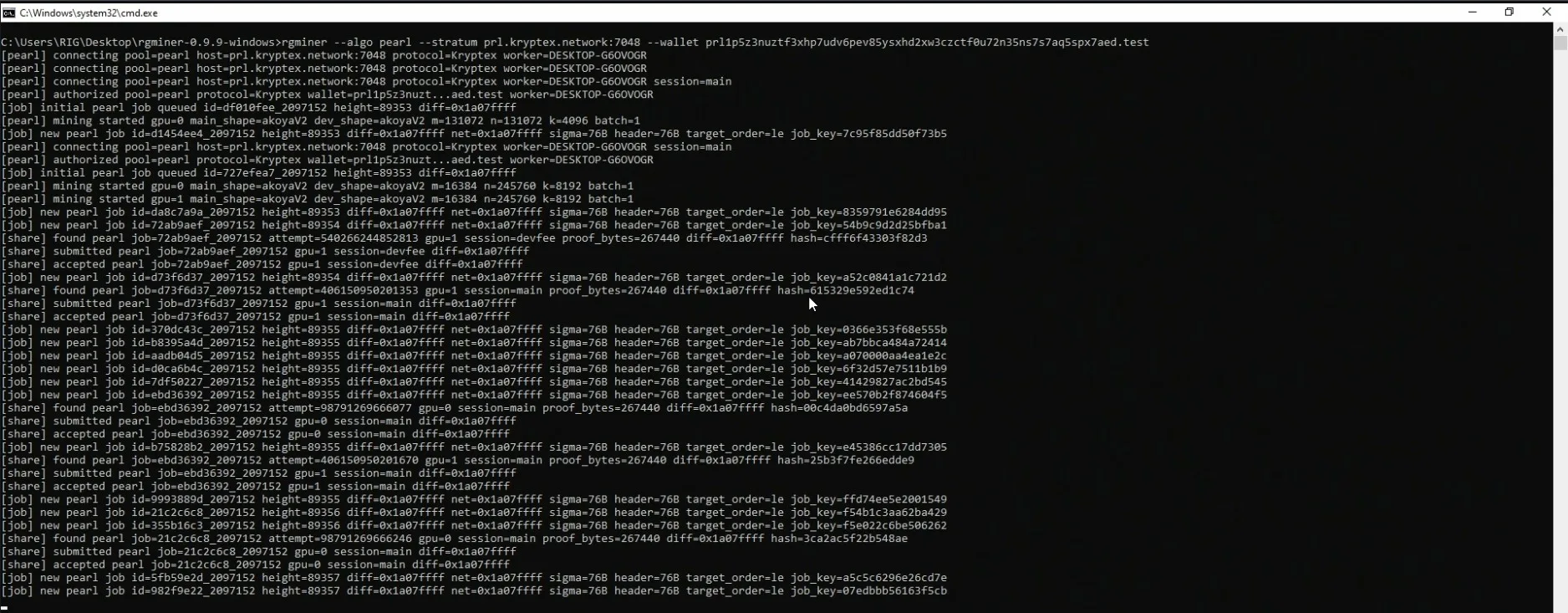
The first line is the command that launched the miner — the algorithm, the pool and your wallet:
rgminer --algo pearl --stratum prl.kryptex.network:7048 --wallet prl1yourwallethere.test
After that RGMiner prints tagged log lines. The three tags are [pearl] (pool/session), [job] (work from the pool) and [share] (results you send back):
[pearl] connecting pool=pearl host=prl.kryptex.network:7048 protocol=Kryptex worker=DESKTOP-G6OVOGR
[pearl] authorized pool=pearl protocol=Kryptex wallet=prl1p5z3nuzt…aed.test worker=DESKTOP-G6OVOGR
[job]   initial pearl job queued id=df010fee_2097152 height=89353 diff=0x1a07ffff
[pearl] mining started gpu=0 main_shape=akoyaV2 dev_shape=akoyaV2 m=131072 n=131072 k=4096 batch=1
[job]   new pearl job id=d1454ee4_2097152 height=89353 diff=0x1a07ffff net=0x1a07ffff sigma=76B header=76B target_order=le job_key=7c95f85dd50f73b5
[share] found pearl job=72ab9aef_2097152 attempt=540266244852813 gpu=1 session=devfee proof_bytes=267440 diff=0x1a07ffff hash=cfff6f43303f82d3
[share] submitted pearl job=72ab9aef_2097152 gpu=1 session=devfee diff=0x1a07ffff
[share] accepted pearl job=72ab9aef_2097152 gpu=1 session=devfee diff=0x1a07ffff
1. Connecting [pearl] connecting — RGMiner opens the pool connection. It auto-selects the pool dialect (protocol=Kryptex on the Kryptex pool — you don't need to pass --proto), and worker is the rig name (here the machine name, since none was set after the dot).
2. Login [pearl] authorized — the pool accepted your wallet and worker; from here you're mining. The wallet shown is yours, truncated.
3. Jobs [job] initial … / new … — work handed out by the pool. height is the block height, diff / net the share and network difficulty, and job_key identifies the job.
4. Kernel start [pearl] mining started gpu=N — the Pearl kernel is running on each GPU. main_shape / dev_shape is the kernel variant (akoyaV2) and m/n/k its matrix dimensions — these differ per card depending on the GPU.
5. Shares [share] found → submitted → accepted — the lifecycle of a result: found on a GPU, sent to the pool, then accepted. session=main is your own mining; session=devfee is the periodic dev-fee round. A steady stream of accepted lines means everything is working.