Description of messages in the Fl4shMiner window
How to read the Fl4shMiner console — status lines, stat blocks, the per-GPU table and the LOG section.
What can you see in the miner window?
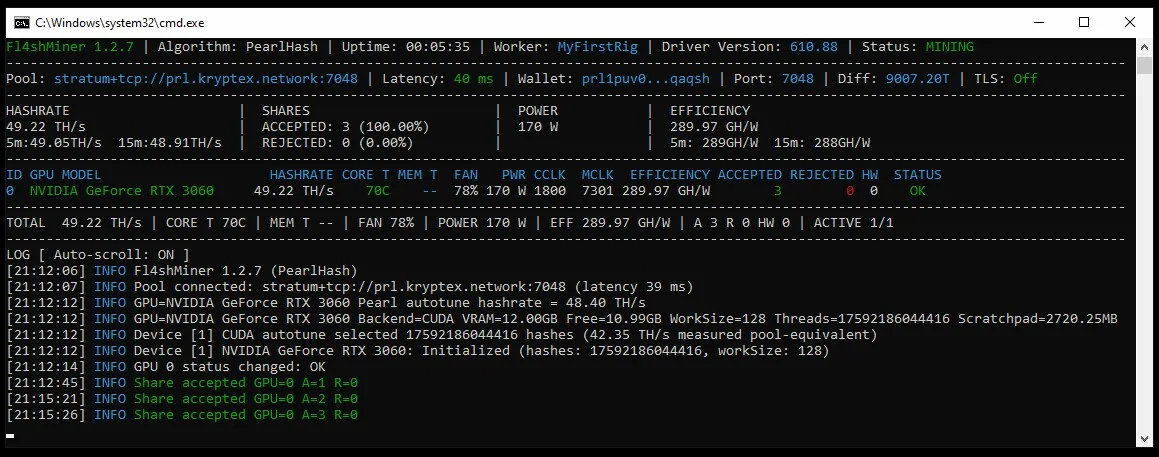
The two status lines
Fl4shMiner 1.2.7 | Algorithm: PearlHash | Uptime | Worker | Driver Version | Status: MINING
Pool | Latency | Wallet | Port | Diff | TLS
The top line: miner version, algorithm — PearlHash for Pearl (PRL) — uptime, worker, driver version and state, normally Status: MINING. On Linux and HiveOS Fl4shMiner needs NVIDIA driver 580 or newer.
The second line is the pool session: stratum URL, latency, wallet, port, current share difficulty and TLS. For Kryptex that is stratum+tcp://prl.kryptex.network:7048, and Fl4shMiner turns -w <WALLET>.<WORKER> into the wallet/worker login Kryptex expects.
The four stat blocks
HASHRATE and EFFICIENCY (GH/W) come with 5- and 15-minute averages. SHARES shows ACCEPTED and REJECTED with percentages, POWER is what the cards draw.
The per-GPU table
ID GPU MODEL HASHRATE CORE T MEM T FAN PWR CCLK MCLK EFFICIENCY ACCEPTED REJECTED HW STATUSEach card gets a row and TOTAL sums them: ID, GPU MODEL, its own hashrate and efficiency, telemetry (core and memory temperature, fan, power, clocks), its ACCEPTED/REJECTED/HW counters and STATUS.
PearlHash runs on NVIDIA RTX 30, 40 and 50 series only — Fl4shMiner's AMD support covers its other algorithms, not PRL.
The log
A normal start in the LOG [ Auto-scroll: ON ] section:
INFO Fl4shMiner 1.2.7 (PearlHash)
INFO Pool connected: stratum+tcp://prl.kryptex.network:7048 (latency 39 ms)
INFO GPU=NVIDIA GeForce RTX 3060 Pearl autotune hashrate = 48.40 TH/s
INFO GPU=NVIDIA GeForce RTX 3060 Backend=CUDA VRAM=12.00GB Free=10.99GB WorkSize=128 Threads=17592186044416 Scratchpad=2720.25MB
INFO Device [1] CUDA autotune selected 17592186044416 hashes (42.35 TH/s measured pool-equivalent)
INFO Device [1] NVIDIA GeForce RTX 3060: Initialized (hashes: 17592186044416, workSize: 128)
INFO GPU 0 status changed: OK
INFO Share accepted GPU=0 A=1 R=0
1. Autotune Pearl autotune hashrate and CUDA autotune selected … hashes — at startup the miner picks the best launch configuration for each card.
2. Device inventory VRAM=… Free=… Scratchpad=… — how much card memory PearlHash occupies.
3. Shares Share accepted GPU=0 A=1 R=0 — A/R are that card's accepted and rejected totals.
Autotune measures for 4 seconds by default (--autotune-duration), --autotune turns startup tuning on or off, and --no-latency-retune stops the later retuning for pool latency.
If shares are rejected
Rejections show up as counters: if REJECTED climbs on one row while the rest stay clean, that card is the problem; if it climbs everywhere, look at the pool session and Latency.
With no share response for 20 minutes Fl4shMiner restarts in the same console (--watchdog-share, default 20m); connection and DNS failures retry every 10 seconds.