Description of messages in the ARCMiner window
How to read ARCMiner's console output — GPU detection, the pool connection and login, slice tuning, job assignment, and the periodic mining-stats line.
What can you see in the miner window?
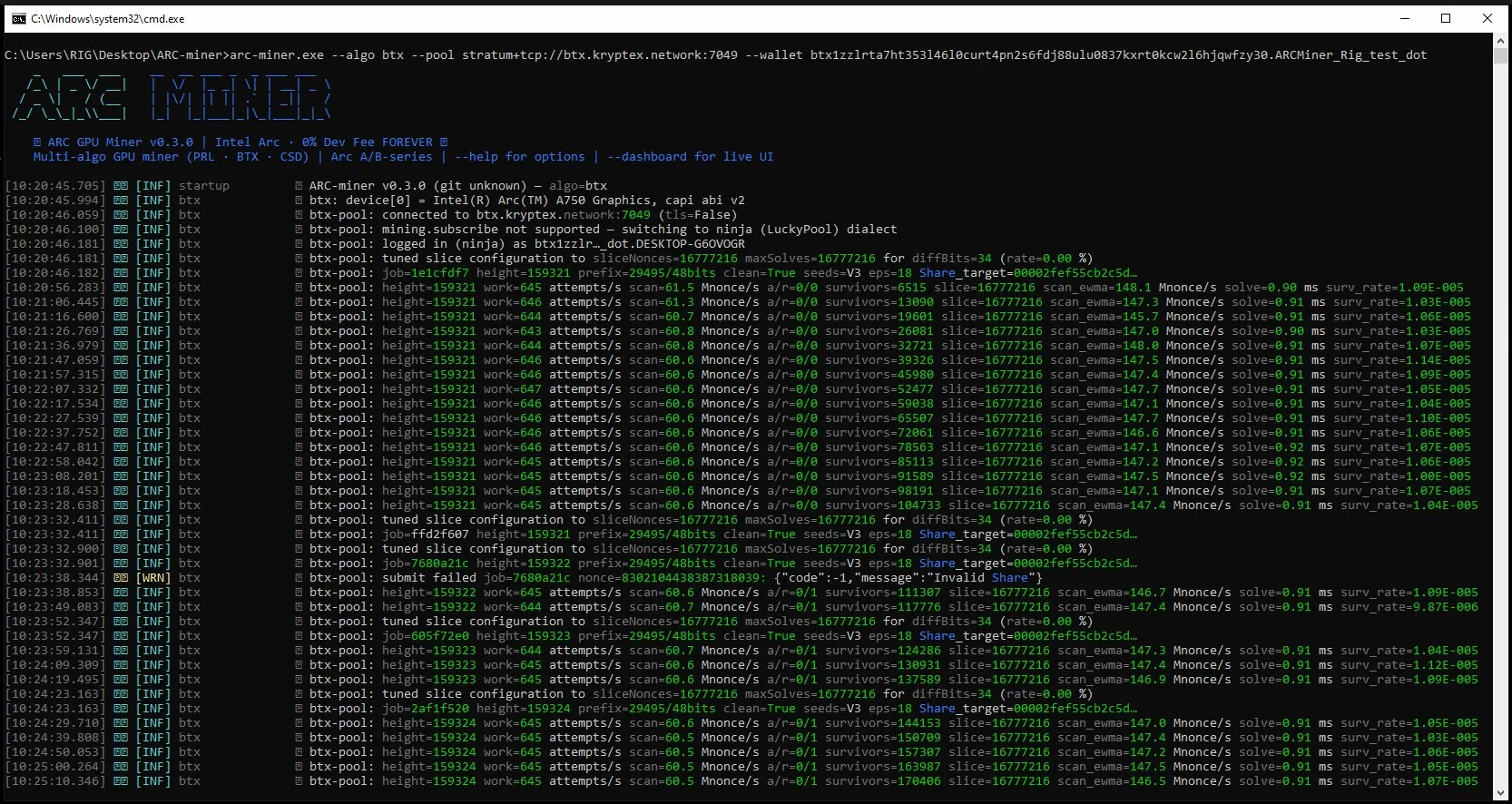
On launch, ARCMiner prints an ASCII banner with its version, the selected algorithm and the "0% Dev Fee" line, then a series of [INF] log lines:
[INF] startup  ARC-miner v0.3.0 (git unknown) — algo=btx
[INF] btx      device[0] = Intel(R) Arc(TM) A750 Graphics, capi abi v2
[INF] btx      connected to btx.kryptex.network:7049 (tls=False)
[INF] btx      btx-pool: logged in (ninja) as btx1zzlr…dot.DESKTOP-G6OVOGR
[INF] btx      btx-pool: tuned slice configuration to sliceNonces=16777216 maxSolves=16777216 for diffBits=34
[INF] btx      btx-pool: job=1e1cfdf7 height=159321 prefix=29495/48bits clean=True seeds=V3 eps=18 Share_target=00002fef…
1. Startup startup / device[0] — the miner version and algorithm, then each Intel Arc GPU it detected (here an Arc A750).
2. Pool connection connected to … — the pool address and whether TLS is on (tls=False on the plain-TCP port).
3. Login logged in (ninja) as … — the pool handshake and authorization succeeded; the name shown is your wallet plus the rig name you set after the dot. (ARCMiner auto-switches to the pool's "ninja / LuckyPool" dialect if mining.subscribe isn't supported — this is normal.)
4. Slice tuning tuned slice configuration — ARCMiner sized the GPU work batch (sliceNonces / maxSolves) for the current pool difficulty (diffBits).
5. New job job=… — a fresh job from the pool, with its block height and the Share_target to beat.
6. Mining stats — printed periodically, one line per interval:
height=159321 work=645 attempts/s scan=61.5 Mnonce/s a/r=0/0 survivors=6515 slice=16777216 scan_ewma=148.1 Mnonce/s solve=0.90 ms surv_rate=1.09E-005
  - height — block height of the current job.
  - work — running work-unit counter.
  - scan — instantaneous scan rate, in Mnonce/s; scan_ewma is its smoothed average.
  - a/r — accepted / rejected shares.
  - survivors — candidate solutions that passed the coarse filter this slice.
  - slice — nonces per GPU batch (from the slice tuning above).
  - solve — GPU solve time per batch, in ms.
  - surv_rate — survivor rate (fraction of nonces passing the filter).
7. Rejected share [WRN] submit failed … Invalid Share — an occasional rejected or stale share; a few are normal, but a constant stream usually points to an unstable overclock or a flaky connection.