
How to understand the messages in the lpminer window? Share statistics, mining status, and working parameters.
What can you see in the miner window?
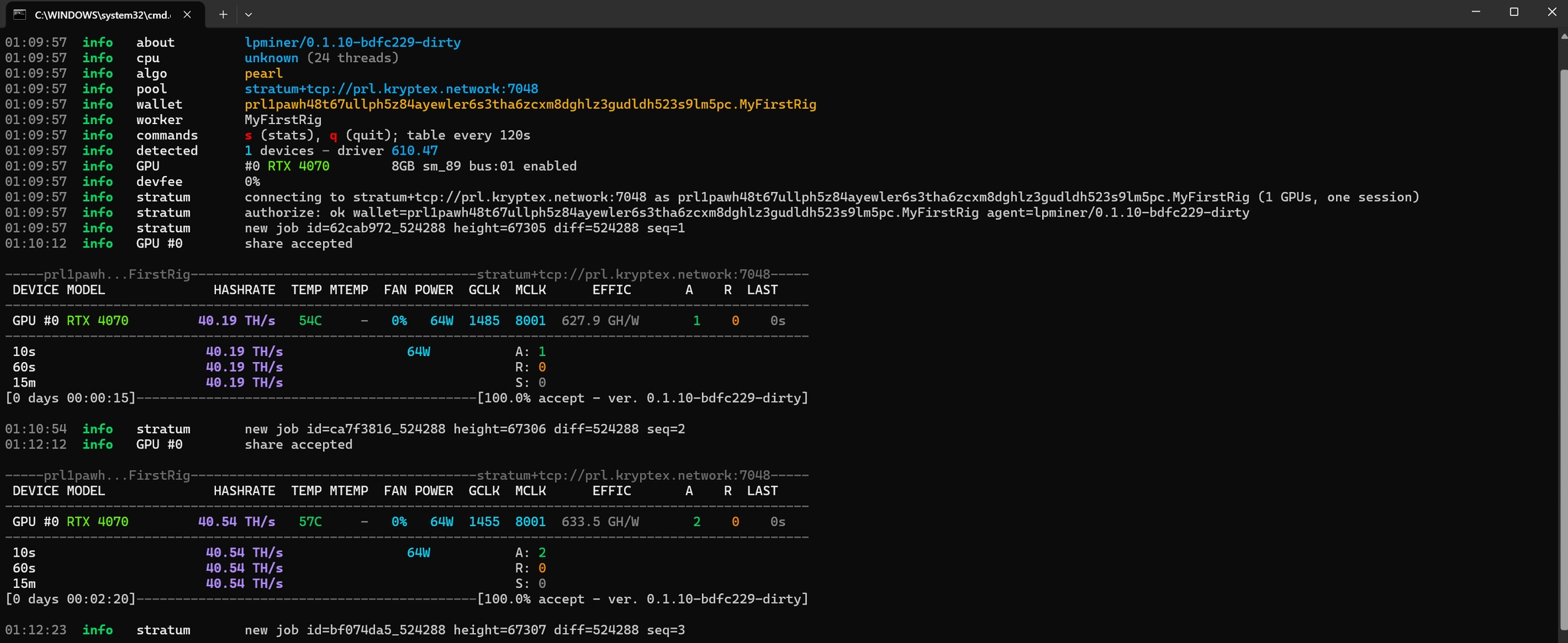
1. Miner version about — the lpminer version.
2. CPU cpu — CPU model and thread count.
3. Algorithm algo — the algorithm in use pearl.
4. Pool pool — the pool address the miner connects to.
5. Wallet and worker wallet, worker — wallet address and rig (worker) name.
6. Hotkeys commands — s prints statistics, q quits; the stats table is printed every 120 seconds.
7. Device detection detected, GPU #0 — number of GPUs and driver version, plus the GPU model, memory size, architecture, and PCI-E bus.
8. Developer fee devfee — the miner fee as a percentage.
9. Pool connection stratum — pool authorization, new job assignment new job, and job difficulty diff.
10. Mining table and GPU monitoring:
- DEVICE — GPU number.
- MODEL — GPU name.
- HASHRATE — GPU hash rate.
- TEMP — GPU core temperature.
- MTEMP — memory temperature (if supported, otherwise «–»).
- FAN — fan speed.
- POWER — power consumption.
- GCLK — current core clock, MHz.
- MCLK — current memory clock, MHz.
- EFFIC — energy efficiency (hash rate per watt).
- A — number of accepted shares.
- R — number of rejected shares.
- LAST — time since the last submitted share.
11. Hash rate and share summary:
- 10s / 60s / 15m — average hash rate over the last 10 seconds, 60 seconds, and 15 minutes.
- A / R / S — total Accepted, Rejected, and Stale shares.
- [0 days 00:00:15] — miner uptime since launch.
- [100.0% accept] — share acceptance rate and miner version.
12. Notification that a share has been found share accepted.

