

Description of messages in the TW Pearl Miner window
How to read TW Pearl Miner's full-screen interface — the header, the pool/latency panel, the per-GPU stats table and the share log.
What can you see in the miner window?
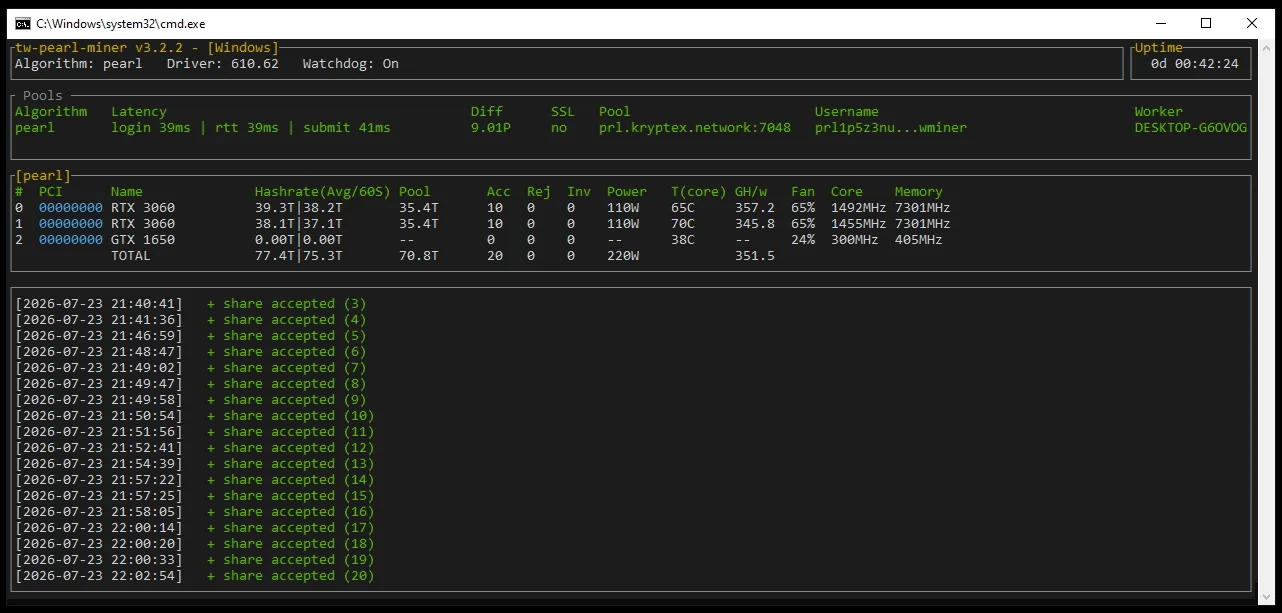
1. Header — the miner version and platform, the Algorithm (pearl), the NVIDIA Driver version, Watchdog state and total Uptime.
2. Pools panel — the connection at a glance: Latency (login / round-trip / submit times), share Diff, whether SSL is on, the Pool address (prl.kryptex.network:7048), your Username (wallet, truncated) and Worker name.
3. Per-GPU table [pearl] — one row per card plus a TOTAL. Columns: Hashrate (Avg/60S), pool-effective hashrate, Acc/Rej/Inv (accepted / rejected / invalid shares), Power, core temperature T(core), efficiency GH/w, Fan, and Core / Memory clocks.
In the example, two RTX 3060s mine at ~38–39 TH/s each; the GTX 1650 sits at 0.00T — GTX 16-series cards have no tensor cores and aren't supported, so they simply idle.
4. Log panel — timestamped events, mostly + share accepted (N) lines with a running counter. A steady stream of accepted shares means everything is working; rejected or invalid shares usually point to an unstable overclock or a flaky connection.
