Description of messages in the lpminer window
How to understand the messages in the lpminer window? Share statistics, mining status, and working parameters.
What can you see in the miner window?
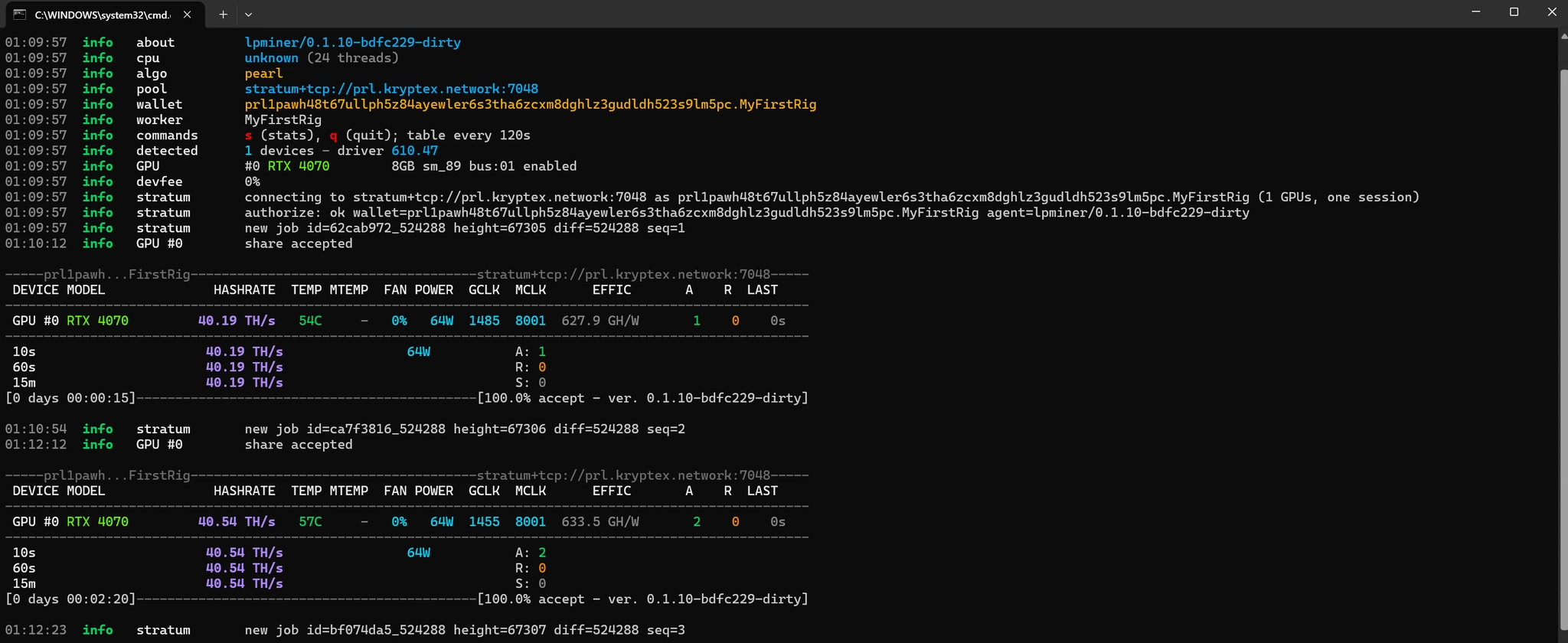
1. Miner version about — the lpminer version.
2. CPU cpu — CPU model and thread count.
3. Algorithm algo — the algorithm in use pearl.
4. Pool pool — the pool address the miner connects to.
5. Wallet and worker wallet, worker — wallet address and rig (worker) name.
6. Hotkeys commands — s prints statistics, q quits; the stats table is printed every 120 seconds.
7. Device detection detected, GPU #0 — number of GPUs and driver version, plus the GPU model, memory size, architecture, and PCI-E bus.
8. Developer fee devfee — the miner fee as a percentage.
9. Pool connection stratum — pool authorization, new job assignment new job, and job difficulty diff.
10. Mining table and GPU monitoring:
    - DEVICE — GPU number.
    - MODEL — GPU name.
    - HASHRATE — GPU hash rate.
    - TEMP — GPU core temperature.
    - MTEMP — memory temperature (if supported, otherwise «–»).
    - FAN — fan speed.
    - POWER — power consumption.
    - GCLK — current core clock, MHz.
    - MCLK — current memory clock, MHz.
    - EFFIC — energy efficiency (hash rate per watt).
    - A — number of accepted shares.
    - R — number of rejected shares.
    - LAST — time since the last submitted share.
11. Hash rate and share summary:
    - 10s / 60s / 15m — average hash rate over the last 10 seconds, 60 seconds, and 15 minutes.
    - A / R / S — total Accepted, Rejected, and Stale shares.
    - [0 days 00:00:15] — miner uptime since launch.
    - [100.0% accept] — share acceptance rate and miner version.
12. Notification that a share has been found share accepted.